
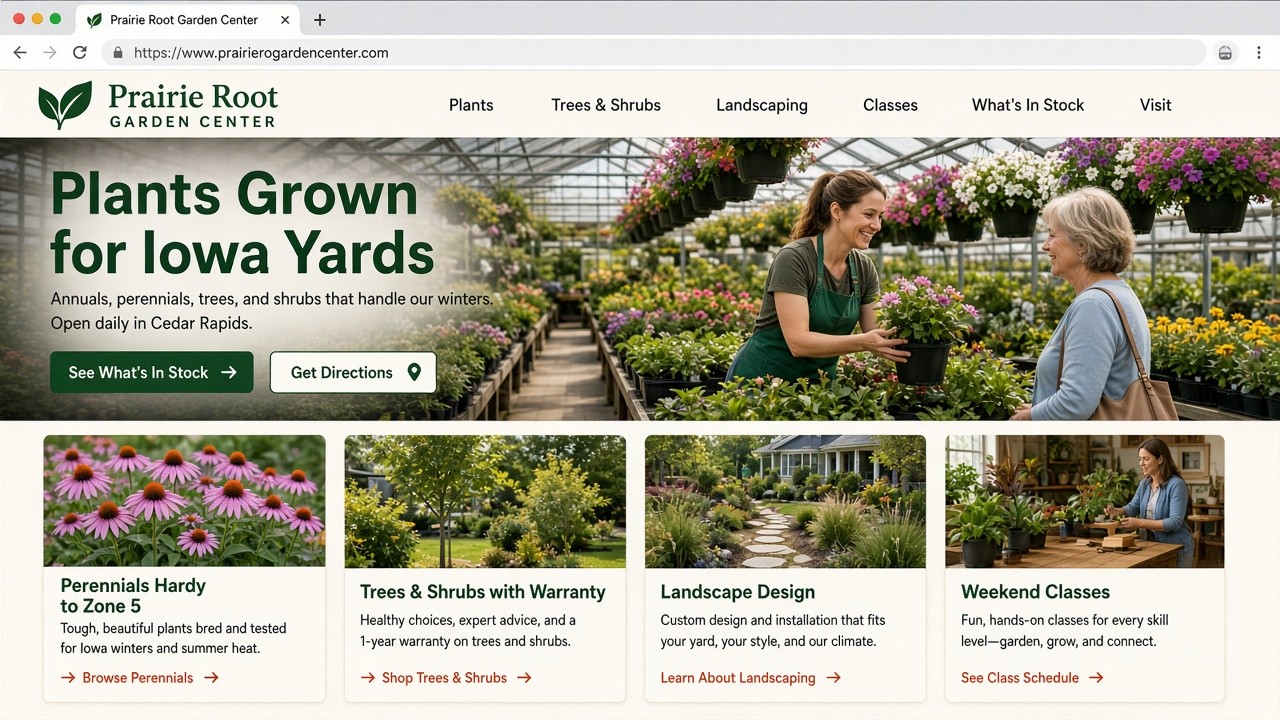
A garden center website should answer what people ask before they load the kids in the car: what you have in stock right now, what to plant this week, which plants actually make it through an Iowa winter, what the tree warranty covers, whether you deliver and plant, and what time you close. Put those answers in plain text on pages you own, and keep the in-stock page dated. That is the marketing. Design is the layout that makes it easy to read on a phone in the parking lot and easy for search and AI to cite.
Most garden centers lean on a Facebook page, a spring ad in the paper, and a sign out front. That works for regulars. But the new homeowner with a bare yard, the person whose ash tree just came down, and the gardener hunting for a specific hosta usually start by asking a phone or an AI assistant. If your site is a pretty homepage with last year’s hours, you are not part of that answer.
Who is reading the site
Garden center traffic comes from a few groups.
Weekend gardeners. They want to know if the tomatoes are in, what is blooming, and whether it is worth the drive today.
New homeowners and people starting over. They have a yard and no plan. They want to know what grows here, what it costs to fill a bed, and whether someone can help.
People replacing trees. Storms, emerald ash borer, and old age take trees down every year. They want to know what to plant instead, what size you carry, and whether you deliver and plant it.
Landscapers, contractors, and HOAs. They want to know if you sell wholesale or contractor pricing and how big orders work.
Search engines and AI assistants. When someone asks ChatGPT, Gemini, Grok, or Google where to buy perennials near Cedar Rapids, or what shade tree to plant in Iowa, those tools look for plain facts on pages they can read. A slideshow of flowers with no words gives them almost nothing.
What the homepage has to say in the first screen
In plain HTML text, not baked into a graphic:
- Your name, your town, and the area you serve
- What you sell and do: annuals, perennials, vegetables, trees, shrubs, landscape design, installation — only what you actually do
- Today’s hours, and the season you are open if you close for winter
- A link to what is in stock this week
- Two clear buttons: See What’s In Stock and Call or Get Directions
Seasonal hours belong on the homepage, not buried in a post. People check before they drive.
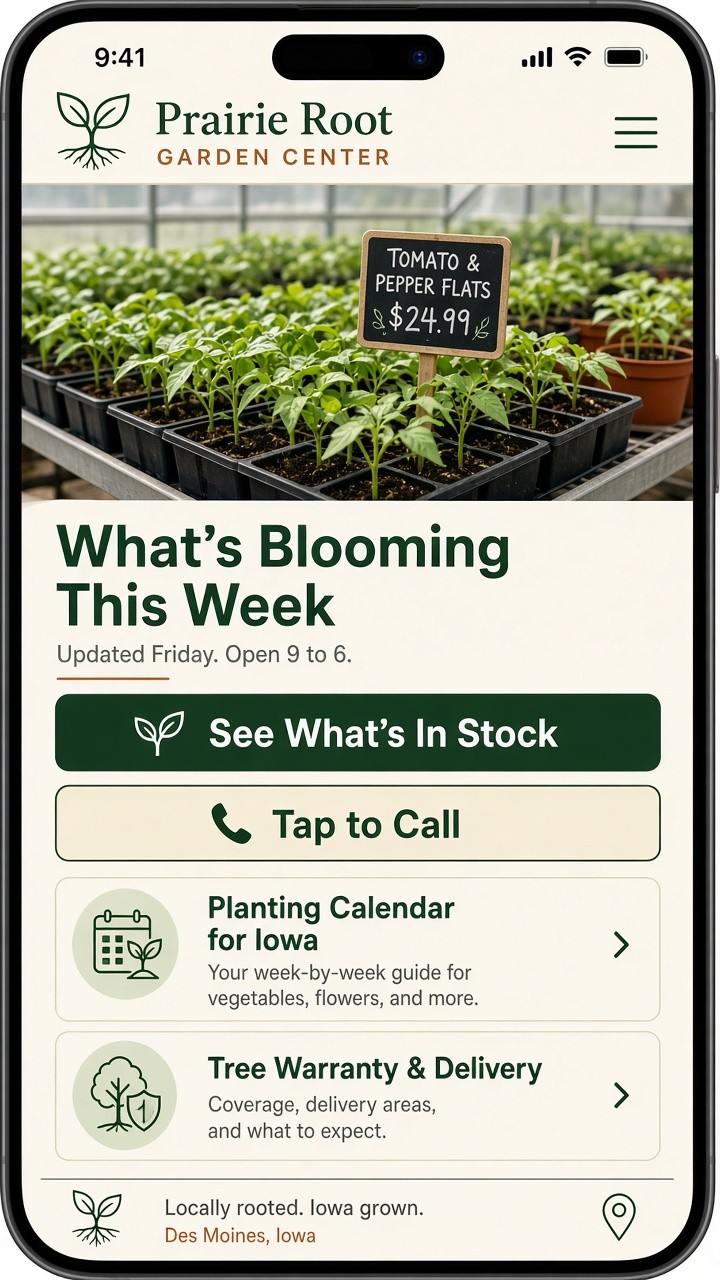
The dated what’s-in-stock page is the page competitors skip
This is the one almost no garden center does, and it is the one customers want most. Big box stores cannot tell you what is on their bench in a way anyone trusts. You can.
You do not need a full online store. A simple page you update once or twice a week does the job:
- A date at the top: “Updated Friday morning”
- What just came in: tomato and pepper flats, hanging baskets, a new load of shrubs
- What is going fast and what is sold out for the season
- What is coming next week
- Two or three phone photos of the benches
Keep it short and keep it honest. A page that says “Sold out of Knock Out roses until the next truck” saves a wasted trip and earns trust. Over a season, those weekly updates also tell search and AI that your business is open, active, and stocked, which is a lot more than a dusty homepage says.
A planting calendar written for your area
National planting guides are written for somewhere else. Write your own, in plain words, for your customers:
- When it is usually safe to plant tender annuals and vegetables around your town, and why you wait for the soil to warm, not just the calendar
- What can go in early, like cool-season vegetables and pansies
- When to plant trees and shrubs, and why fall planting works
- When to divide perennials, plant bulbs, and wrap young trees
- What to do in the yard each month
Date it and update it each year. When someone asks an AI assistant “when can I plant tomatoes in eastern Iowa,” a clear local page from a real garden center is exactly the kind of answer it can cite.
Plants that handle your winters, and your soil
Customers are tired of buying plants that die. Write pages that sort it out:
- Perennials, shrubs, and trees that are hardy for your zone, grouped by sun and shade
- What does well in heavy clay soil, and how to amend it
- Deer- and rabbit-resistant choices, with an honest note that nothing is deer-proof
- Native plants and pollinator plants, if you carry them
- Shade trees to replace ash and other lost trees, with mature size and how fast they grow
Write what you would say at the register. “This one sulks in wet clay” is more useful than a tag that says “adaptable.”
Tree and shrub warranty, delivery, and planting
Big purchases come with questions. Answer them on one page:
- What your warranty covers, how long it lasts, and what the customer has to do, like watering
- What is not covered, in plain words
- Whether you deliver, which towns, and the charge
- Whether you plant, how pricing works, and how far out you are booked
- How to call in a dead tree and what you need to see
If you do not offer a warranty, say so and explain why. Do not post terms you will not honor.
Landscape design and installation
If you design or install, give it its own pages, written for someone who has never hired a landscaper:
- What a design visit looks like and whether it costs anything
- What you install: beds, patios, retaining walls, trees, sod — only what you do
- Rough ranges or what drives the price
- How far out you are booking, and when spring fills up
- Before-and-after photos of real yards with a short caption
Classes, events, and the off season
Classes and events bring people in when sales are slow. Put each one on a page with a date, a time, a price, and a sign-up:
- Container gardening, pruning, and planting workshops
- Kids’ events and fall festivals
- Holiday greenery, wreaths, and poinsettias, if you carry them
- Gift cards, with a link to buy them
If you close for winter, say when and how to reach you. A clear “Closed for the season, reopening in April” page beats a dead phone line.
Proof in plain text
People want to know you are real and that your plants are good.
- Who you are, how long you have been growing or selling, and whether you grow your own
- Who answers plant questions, by name if they are comfortable with it
- Photos from your own greenhouse and yard, not stock flowers
- Reviews on a page you own, plus a link to Google Business
Do not invent customer counts or post photos from a catalog as if they were yours. State what you can back up.
Content that feeds search and AI without theater
Useful posts for a garden center read like notes from the greenhouse:
- What came in on this week’s truck
- Five shade trees we would plant to replace an ash, and why
- Why your hydrangea did not bloom this year
- How to plant a tree so it is still alive in five years
- Tomatoes: what we grow, what sells out first, and when to plant
- Fall clean-up: what to cut back and what to leave for the birds
Each one answers a real question with your own photo. Snap a picture of the bench when the truck comes in. That is a post. That is the kind of page that gets a garden center named when someone asks where to buy plants near them.
Why the website matters more now
Websites and SEO are changing. They still matter, and for garden centers they matter more now. Bots now make a large share of web requests. Cloudflare’s Matthew Prince has said bots passed humans on Cloudflare’s network in mid-2026, about 57% bots and 43% humans. That counts HTTP requests, not hours of human attention. People still drive out and pick their own plants. More and more, ChatGPT, Gemini, Grok, and Google’s AI answers decide which garden centers a customer hears about first. Those tools look for clear facts: what you carry, when you are open, what grows here, and where you are.
Your website should be the source of record. Facebook, Google Business, and the sign out front can all point back to it. Keep your true hours, stock updates, planting advice, warranty terms, and services on a domain you own.
Design rules that fit a garden center
- Fast on a phone: light pages, compressed photos, text first
- Hours, directions, and Call one tap from any page
- Navigation: What’s In Stock, Plants, Trees and Shrubs, Landscaping, Planting Calendar, Classes, Visit
- Hours, stock, warranty, and plant lists in real text, not images or PDFs
- Your own photos with short captions, not a slideshow of stock flowers
- A stock page that is easy to update from a phone in two minutes
- You own the domain, hosting, and content
What Upley does for companies like this
Upley builds and hosts websites for Iowa and Midwest businesses. For a garden center or nursery that means plain-text pages for what you sell and do, a what’s-in-stock page you can update from your phone, a local planting calendar, plant lists by sun, shade, and soil, a warranty and delivery page, landscape design pages, class and event pages with dates, and an easy way to post photos of the benches with a few words.
Same Iowa web team that ran Big Ten Web Design, handling design, hosting, and SEO, plus the modern layer so search and AI can find the true file about your garden center, what you have, and when you are open.
If your current site is one page and a Facebook link, start with the homepage five facts, a dated what’s-in-stock page, and a planting calendar for your area. Then add the warranty page and a tree replacement page before fall planting season.
Book 30 minutes
Thirty minutes. Iowa time. No deck.
Iowa City, Cedar Rapids, Quad Cities / Davenport